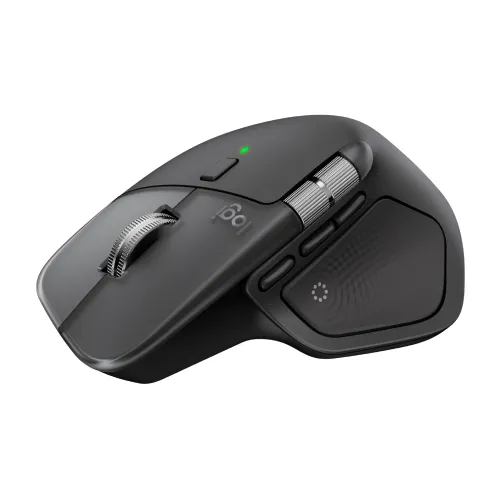
Logitech MX Master 4 Wireless Mouse

Mouse • Brand: Logitech • Aggregating live prices from leading computer stores in Bangladesh.

Status
In Stock
2 listings tracked
Lowest Deal 13,999 Best Deal
Price Range 13,999 to 14,500 Save 4%
Logitech MX Master 4 Wireless Mouse

Product Description

The **Logitech MX Master 4** is a premium quality **Mouse** designed to offer durability, high efficiency, and seamless compatibility with standard desktop PC configurations. You can buy this component starting from **13,999 ৳**, compared dynamically across 2 major computer shops.
Part ID: #CAN-08806 Last Updated: 1 week ago

Available Deals & Price Comparison

Prices updated daily
Retailer Stock Status Price Last Checked Action
TechLand BD Logitech MX Master 4 8000 DPI Wireless Mouse
In Stock 13,999 1 hour ago
Star Tech Logitech MX Master 4 Wireless Mouse
In Stock 14,500 1 hour ago

Historical Pricing Trend

Product Specifications

Main Features

Number of Keys Number of Buttons: 8 Scroll Wheel: Yes, MagSpeed wheel with smart shift Horizontal scroll: Yes Thumb wheel: Yes, same as horizontal scroll Gesture button: Yes Customization app: Yes, Options + and basic support in Tune
Connection Type Connection Type: Wireless Wireless technology: Bluetooth Low Energy Wireless range: 10 m Bluetooth Low Energy (BLE): 5.1
Optical Sensor Sensor Technology: Darkfield high precision Nominal value: 1000
Resolution DPI (Minimal and maximal value): 200-8000 (can be set in increments of 50 DPI)

Physical Specifications

Color Graphite: 910-007562 Pale Gray: 910-007563
Dimension Height: 128.15 mm Width: 88.35 mm Depth: 50.8 mm
Weight 150 g
Battery Life Battery type: Rechargeable 650 mAh Battery life: 70 days

Warranty Information

Warranty 01-Year

Key Features

MPN 910-007565
Model MX Master 4
Sensor Darkfield High Precision, Resolution: 200-8000 DPI
Number of buttons 8, Gesture Button
Scroll Wheel MagSpeed wheel with Smart Shift
Part ID: #CAN-08806 Last Updated: 1 week ago
The Logitech MX Master 4 Wireless Mouse is a high-end productivity tool built for professionals with precision, speed, and smooth control. The Logitech Wireless Mouse is equipped with both 2.4 GHz RF and Bluetooth LE connectivity, ensuring smooth and stable wireless performance across devices. Another notable feature of the Logitech MX Master 4 Wireless Mouse is the Haptic Sense Panel and Action Ring shortcuts, which provide tactile feedback for better control.Haptic Sense PanelProductivity is increased by configurable haptic feedback on particular actions, shortcuts, and notifications. Experience the snap of images on grids, notifications, desktop switching, slider manipulation, and more with the Logitech MX Master 4 Wireless Mouse. For a more individualized approach, use Logi Options+ to add plugins for third-party apps, modify feedback, and intensify.Actions Ring ShortcutsKeep your workflow going with the Logitech MX Master 4 Wireless Mouse's Actions Ring, which places your preferred tools, shortcuts, and actions directly at your cursor. Save up to 63% on mouse movements and avoid all menu hunting. To make the Actions Ring work for you, use Logi Options+ to customize shortcuts and download plugins for third-party apps.Up to 8K DPI SensorWith an 8,000 DPI sensor, you can track precisely on almost any surface, including glass. With a sensor five times more accurate than a standard mouse, the Logitech MX Master 4 Mouse offers quick, pixel-perfect control for large screens and concentrated work processes.Up to 70 days of Battery LifeJust plug it in and get to work, no awkward breaks, just smooth productivity. With the Logitech MX Master 4, the Type-C quick charging allows it to run for up to 70 days on a full charge and for three hours on a quick charge of only one minute.Buy Logitech MX Master 4 Wireless Mouse from Star TechIn Bangladesh, you can get the original Logitech MX Master 4 Wireless Mouse from Star Tech. We have a large collection of the latest Logitech Mouse to purchase for your Desktop PC. Order Online Or Visit your Nearest Star Tech Shop to get yours at the lowest price. The Logitech MX Master 4 Wireless Mouse comes with a 01-Year warranty.FAQ – Logitech MX Master 4 Wireless MouseQ: What is the Logitech MX Master 4 used for?A: The Logitech MX Master 4 is for professionals, designers, and office users who want precise control, ergonomic comfort, and multi-device connectivity.Q: What are the key features of the MX Master 4?A: The MX Master 4 features an ultra-fast MagSpeed scroll wheel, Darkfield 8000 DPI sensor, Bluetooth & Logi Bolt wireless connectivity, multi-device pairing (up to 3 devices), and a built-in rechargeable battery that lasts up to 70 days. It also supports gesture controls and haptic feedback for enhanced workflow efficiency.Q: Is the Logitech MX Master 4 good for gaming?A: The Logitech MX Master 4 is not designed for gaming. Its 125Hz polling rate is perfect for productivity tasks.Q: Does the MX Master 4 work on glass surfaces?A: Yes, with its Darkfield high-precision sensor, the MX Master 4 can track accurately on almost any surface, including glass and glossy desks.Q: How many devices can the MX Master 4 connect to?A: You can pair and switch between three devices simultaneously using Bluetooth or the Logi Bolt receiver. You can easily toggle between devices with the Easy-Switch button.Q: How long does the battery last, and how do I charge it?A: The Logitech MX Master 4 has a built-in rechargeable battery that lasts up to 70 days on a full charge. It charges via a Type-C cable, and a one-minute quick charge can give you up to three hours of use.Q: What is the difference between MX Master 3 and MX Master 4?A: The Logitech MX Master 4 introduces haptic feedback, a refined Action Ring control system, Type-C Logi Bolt receiver, and improved ergonomics compared to the MX Master 3. It also features smoother scrolling and faster gesture customization through the Logi Options+ software.Q: Is the MX Master 4 compatible with Mac and Windows?A: Yes, it works perfectly with Windows, macOS, Linux, and ChromeOS.Q: Can I use the MX Master 4 while charging?A: Yes. You can continue using the Logitech MX Master 4 Mouse even when it’s charging via Type-C.Q: Is the Logitech MX Master 4 comfortable for long use?A: Absolutely. The MX Master 4 is ergonomically sculpted to support your hand and wrist, with a thumb rest and soft-grip texture that reduces fatigue during extended work sessions.Q: Does it support customization?A: Yes, you can use Logi Options+ software to customize button functions, adjust DPI sensitivity, create application-specific profiles, and configure gesture commands.

Discussion & Comments

You must be logged in to post comments.

No comments yet. Be the first to start the discussion!