Status
Check Stores
2 stores
Lowest Deal
64,000 BDT
Best Deal
Price Range
Single price listing
Product Description
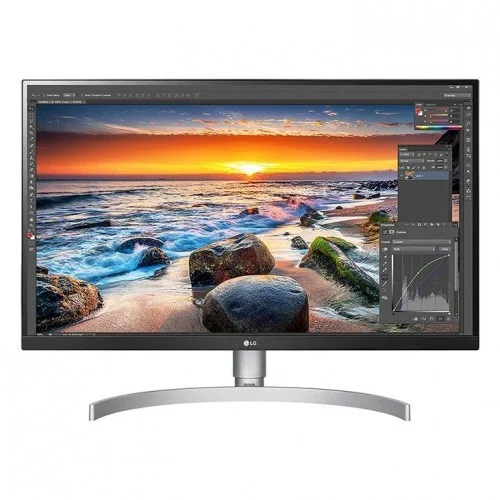
The **LG 27UL850-W** is a premium quality **Monitor** designed to offer durability, high efficiency, and seamless compatibility with standard desktop PC configurations. Currently, the lowest price in Bangladesh for this item is **64,000 ৳**, with active inventory listings tracked from Creatus Computer, Nexus Computer.
Part ID: #CAN-08340
Last Updated: 3 months ago
Available Deals & Price Comparison
Prices updated dailyHistorical Pricing Trend
Product Specifications
Display Features
Resolution
3840 x 2160
Refresh Rate
60Hz
Response Time
5ms (GtG at Faster)
Panel Type
IPS
Screen Size
27" Flat
Brightness
350cd (typ) / 280cd (Min)
Viewing Angle
178º(R/L), 178º(U/D)
Contrast Ratio
700:1 (Min.), 1000:1 (Typ.)
Aspect Ratio
Aspect Ratio: 16:9
Others Features
Anti Glare, 3H
General Information
Features
Gaming, Free Sync
Input Type
HDMI, Display Port, Audio Jack, USB
Screen Size
27 inch
Connectivity
HDMI
Yes x 2
Display Port
Yes x 1
USB Port(s)
USB Type-C: Yes USB Down-stream: YES (2ea/ver3.0)
Audio Jack
Headphone Out: Yes
Audio/Video Features
Flicker Free
Yes
Free Sync Support
Yes
Others
Black Stabilizer: Yes Color Weakness: Yes Dynamic Action Sync: Yes Smart Energy Saving: Yes H/W Calibration Ready (True Color Pro): Yes Super Resolution +: Yes Dual Controller: Yes HDR (High Dynamic Range): Yes (HDR10)
Power
Type
External Power(Adapter) Input: 100-240Vac, 50/60Hz
Power Consumption
Power Save/Sleep Mode (Max): Less than 0.5W (HDMI/DP input condition) DC Off (Max): Less than 0.3W Power Consumption (Typ.): 40W Power Consumption (Max.): 130W
Physical Specification
Dimension
With Stand (WxHxD): 24.1" x 22.0" x 9.2" (Up), 24.1" x 17.7" x 9.2" (Down) Without Stand (WxHxD): 24.1" x 14.4" x 1.8"
Weight
With Stand Weight: 13.5 lbs Without Stand Weight: 10.6 lbs
Tilt
Display Position Adjustments: Tilt/Height/Pivot
Warranty Information
Manufacturing Warranty
3 year warranty
Part ID: #CAN-08340
Last Updated: 3 months ago
To more fully realize content creators' vision, this monitor is compatible with VESA DisplayHDR 400 high dynamic range, supporting specific levels of color and brightness that exceed the capabilities of ordinary monitors. Discover a more lifelike picture with high dynamic range, which provides bolder contrast between the brightest and darkest areas of the screen. This VESA DisplayHDR 400 monitor has been rated to deliver impressive peak luminance of 400 nits for undeniably spectacular highlights. This monitor, with 99% coverage of the sRGB spectrum, is a great solution for photographers, graphic designers, or anyone looking for highly accurate color. Specifications: Display Features Panel Type IPS Screen Size 27" Flat Resolution 3840 x 2160 Brightness 350cd (typ) / 280cd (Min) Response Time 5ms (GtG at Faster) Viewing Angle 178º(R/L), 178º(U/D) Contrast Ratio 700:1 (Min.), 1000:1 (Typ.) Aspect Ratio Aspect Ratio: 16:9 Refresh Rate 60Hz Others Features Anti Glare, 3H Connectivity HDMI Yes x 2 Display Port Yes x 1 USB Port(s) USB Type-C: Yes USB Down-stream: YES (2ea/ver3.0) Audio Jack Headphone Out: Yes Audio/Video Features Flicker Free Yes Free Sync Support Yes Others Black Stabilizer: Yes Color Weakness: Yes Dynamic Action Sync: Yes Smart Energy Saving: Yes H/W Calibration Ready (True Color Pro): Yes Super Resolution +: Yes Dual Controller: Yes HDR (High Dynamic Range): Yes (HDR10) Power Type External Power(Adapter) Input: 100-240Vac, 50/60Hz Power Consumption Power Save/Sleep Mode (Max): Less than 0.5W (HDMI/DP input condition) DC Off (Max): Less than 0.3W Power Consumption (Typ.): 40W Power Consumption (Max.): 130W Physical Specification Dimension With Stand (WxHxD): 24.1" x 22.0" x 9.2" (Up), 24.1" x 17.7" x 9.2" (Down) Without Stand (WxHxD): 24.1" x 14.4" x 1.8" Weight With Stand Weight: 13.5 lbs Without Stand Weight: 10.6 lbs Tilt Display Position Adjustments: Tilt/Height/Pivot Warranty Information Manufacturing Warranty 3 year warranty LG IPS MONITOR PRICE IN BANGLADESH LG IPS monitors or “In-Plane Switching” monitors, leverage liquid crystals aligned in parallel to produce rich colors. IPS panels are defined by the shifting patterns of their liquid crystals. These monitors were designed to overcome the limitations of TN panels. The liquid crystal’s ability to shift horizontally creates better viewing angles. LG IPS monitors continue to be the display technology of choice for users that want color accuracy and consistency. LG IPS monitors are really great when it comes to color performance and super-wide viewing angles. The expansive viewing angles provided by IPS monitors help to deliver outstanding color when being viewed from different angles. One major differentiator between IPS monitors and TN monitors is that colors on an IPS monitor won’t shift when being viewed at an angle as drastically as they do on a TN monitor. IPS monitor variations include S-IPS, H-IPS, e-IPS and P-IPS, and PLS (Plane-to-Line Switching), the latter being the latest iteration. Since these variations are all quite similar, they are all collectively referred to as “IPS-type” panels. They all claim to deliver the major benefits associated with IPS monitors – great color and ultra-wide viewing angles. LG IPS-Monitor When it comes to color accuracy, IPS monitors surpass the performance of TN and VA monitors with ease. While latest-gen VA technologies offer comparative performance specs, pro users still claim that IPS monitors reign supreme in this regard. Another important characteristic of IPS monitors is that they are able to support professional color space technologies, such as Adobe RGB. This is due to the fact that LG IPS monitors are able to offer more displayable colors, which help improve color accuracy. In the past, response time and contrast were the initial weakness of IPS technology. Nowadays, however, LG IPS monitor response times have advanced to the point where they are even capable of satisfying gamers, thus resulting in a rising popularity in IPS monitors for gaming. Finding the best LG IPS monitor for you Creatus Computer carries all the top tech brands of IPS monitors and screens. This is considered to be one of the best computer monitors for graphic designers, photographers and videographers, and design engineers because of all the colors IPS monitors can capture. Not only is the color captured accurately, but also consistently, making it easier for creatives and engineers to do their work on an IPS display. Gamers may also benefit from an IPS monitor, although this type of display tends to favor image quality over response time. Consider an LED IPS display for the most energy efficient monitor option, or an LCD IPS display if you’re looking for a generally cheaper option that still solves all of your computer needs. IPS monitors are available in a wide range of styles and sizes, and many even have features like HDMI outputs, headphone jacks, anti-glare flat panel screen, an adjustable base or tiltable screen, but you may want to consider monitor mounts and stands to position your IPS screen exactly where you want it. LG IPS Monitor Advantages: Outstanding color accuracy and consistency Maximum available viewing angles Response times sufficient for most users Virtually eliminates color/contrast shift seen with some VA displays LG IPS Monitor Drawbacks: Below average static contrast ratio Potential white glow from off-angles when viewing dark content. Usually only an issue with lower-end & off-brand IPS monitors More motion blur than a TN monitor LG IPS Monitor Best Uses: Color-critical professional applications Technology enthusiasts Higher-level business/home use Gamers who value image quality over response time ..
Discussion & Comments
You must be logged in to post comments.
No comments yet. Be the first to start the discussion!