Status
In Stock
4 stores
Lowest Deal
63,400 BDT
Best Deal
Price Range
Single price listing
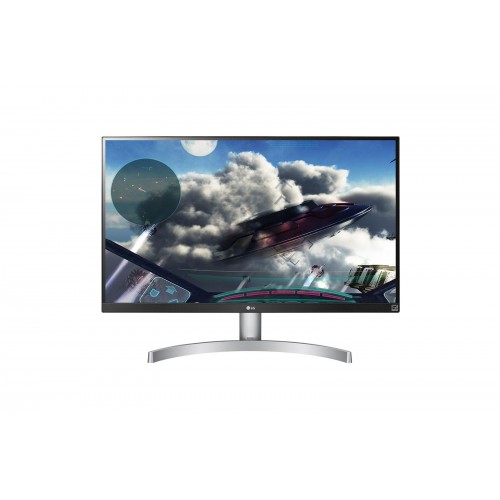
Product Description
The **LG 27UL600-W** is a premium quality **Monitor** designed to offer durability, high efficiency, and seamless compatibility with standard desktop PC configurations. PCPartsBD lists the best deal for this item at **63,400 ৳** after tracking live prices across leading BD tech merchants.
Part ID: #CAN-08561
Last Updated: 3 months ago
Available Deals & Price Comparison
Prices updated daily| Retailer | Stock Status | Price | Last Checked | Action |
|---|---|---|---|---|
|
Computer Village
LG 27UL600-W 27 inch IPS LED 4K UHD Free Sync Monitor
|
In Stock | 63,400 | 1 week ago | |
|
Creatus Computer
LG 27UK600-W 27 INCH 4K UHD IPS LED MONITOR
|
Check Stock | Call for Price | 2 hours ago | |
|
Creatus Computer
LG 27UL600-W 27 INCH VESA 4K UHD IPS LED BORDERLESS MONITOR
|
Check Stock | Call for Price | 2 hours ago | |
|
PC House
LG 27UL600-W 27 inch IPS LED 4K UHD FreeSync Monitor
|
Check Stock | 63,500 | 2 hours ago |
Historical Pricing Trend
Product Specifications
Display Features
Display Size
27 inch
Display Type
LED
Resolution
3840 x 2160
Aspect ratio
16:9
Viewing Angle
178º(R/L), 178º(U/D)
Brightness
350cd (typ) / 280cd (Min)
Contrast Ratio
700:1 (Min.), 1000:1 (Typ.)
Refresh rate
60Hz
Color Support
1.07B
Response Time
5ms (GtG at Faster)
Power
Power Consumption
Power Consumption (Typ.) : 36W Power Consumption (Max.) : 43W Input : 100-240Vac, 50/60Hz DC Off (Max) Less than 0.3W Power Consumption (Energy Star) : 22W
Connectivity
I/O Port
HDMI : Yes x 2 DisplayPort : Yes x 1 Headphone Out : Yes
Audio Features
Speaker Details
Speakers: No, Flicker-Free: Yes, Free Sync Support: Yes
Speaker
No
Physical Specification
Weight
With Stand Weight : 11.5 lbs, Without Stand Weight : 10.4 lbsS, hipping Weight : 16.5 lbs
Dimensions
With Stand (WxHxD) : 24.1" x 17.9" x 8.2", Without Stand (WxHxD) : 24.1" x 14.4" x 1.8", Shipping Dimensions (WxHxD) : 27.3" x 5.8" x 17.2"
WARRANTY INFORMATION
Manufacturing Warranty
03 Years Warranty
Part ID: #CAN-08561
Last Updated: 3 months ago
LG 27UL600-W 27 inch IPS LED 4K UHD FreeSync MonitorThe 27UL600-W 27" 16:9 4K FreeSync IPS Monitor From LG. With A Large 27" IPS (In-Plane Switching) Panel Featuring A 3840 X 2160 Resolution, It Delivers Crisp And Clear Details With Vivid Colors, Even At Wide Viewing Angles. Moreover, This 10-Bit Display Covers 99% Of The SRGB Color Palette For Accurate, True To Life Color. For Gaming, It Supports AMD FreeSync, Which Syncs The Display's Refresh Rate With Your Graphics Cards Frame Rate Output, Reducing Stuttering And Tearing For A Smoother Gaming Experience. Connect It To Your System Via HDMI Or DisplayPort, And Then Tilt, Pivot, And Adjust Its Height To Your Viewing Preference.4K UHD HDRTo More Fully Realize Content Creators' Vision, This Monitor Is Compatible With VESA DisplayHDR 400 High Dynamic Range, Supporting Specific Levels Of Color And Brightness That Exceed The Capabilities Of Ordinary Monitors.VESA Display HDR 400CLEARER And BRIGHTER HDRDiscover A More Lifelike Picture With High Dynamic Range, Which Provides Bolder Contrast Between The Brightest And Darkest Areas Of The Screen. This VESA DisplayHDR 400 Monitor Has Been Rated To Deliver Impressive Peak Luminance Of 400 Nits For Undeniably Spectacular Highlights.IPS With SRGB 99% (Typ.)This Monitor, With 99% Coverage Of The SRGB Spectrum, Is A Great Solution For Photographers, Graphic Designers Or Anyone Looking For Highly Accurate Color.HDCP 2.2 CompatibleConnect With Confidence: This LG 4K Monitor Is Compatible With The Latest HDCP 2.2 Copy Protection, So It Will Display Video From 4K Streaming Services, Game Consoles And Ultra HD Blu-Ray Disc Players.Radeon FreeSyncRadeon FreeSync Reduces The Tearing And Stuttering That Occur Between A Graphic Cards Frame Rate And A Monitor's Refresh Rate Enabling Smoother Motion And Less Stuttering In Demanding Games.Game ModeGame Modes For First-Person-Shooter Games And Even A RTS Pre-Set Mode Allow You To Choose The Best Conditions For You And The Game You're Playing.On-Screen ControlOn-Screen Control Puts A Host Of Essential Monitor Settings Into A Handy Window For Quick, Easy Access. Volume, Brightness, Picture Mode Presets, Screen Split 2.0 And Dual Controller And More Can Now Be Adjusted With Just A Few Clicks Of The Mouse, Instead Of Hard Buttons On The Monitor.
Discussion & Comments
You must be logged in to post comments.
No comments yet. Be the first to start the discussion!