Status
In Stock
4 stores
Lowest Deal
35,500 BDT
Best Deal
Price Range
Single price listing
Product Description
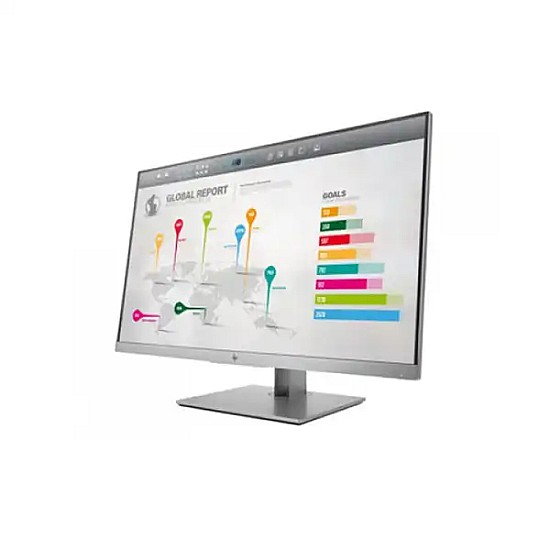
The **HP EliteDisplay E273q 27"** is a premium quality **Monitor** designed to offer durability, high efficiency, and seamless compatibility with standard desktop PC configurations. PCPartsBD lists the best deal for this item at **35,500 ৳** after tracking live prices across leading BD tech merchants.
Part ID: #CAN-08543
Last Updated: 3 months ago
Available Deals & Price Comparison
Prices updated daily| Retailer | Stock Status | Price | Last Checked | Action |
|---|---|---|---|---|
|
Computer Village
HP EliteDisplay E273q 27 Inch 2K Monitor
|
In Stock | 35,500 | 1 week ago | |
|
PC House
HP EliteDisplay E273q 27 Inch 2K Monitor
|
In Stock | 35,500 | 2 hours ago | |
|
Ultra Technology
HP EliteDisplay E273q 27 Inch 2K Monitor
|
Check Stock | Call for Price | 2 hours ago | |
|
Nexus Computer
HP EliteDisplay E273q 27 Inch 2K QHD Monitor
|
Check Stock | 35,400 | 2 hours ago |
Historical Pricing Trend
Product Specifications
Display Features
Panel Type
IPS Micro Edge, LED backlight
Screen Size
27 inches(Diagonal) https://docs.google.com/document/d/1bRcHJeTexxqyPQRjl1wKV9v6ZgV1msyy05-rikZxPlI/edit#
Resolution
QHD (2560 x 1440) Display
Brightness
350 cd/m2
Response Time
5 ms
Viewing Angle
Up to 178° horizontal Up to 178° vertical
Contrast Ratio
Static: 1,000:1 (typical)Dynamic: 5,000,000:1 (typical)
Aspect Ratio
16:9
Refresh Rate
60 Hz
Color Support
Up to 16.7 million colors with the use of FRC technology (8-bit)
Technical Info
Power Consumption
power delivery up to 15 W (5 V, 3 A))
Video Features
Others
Power cable length: 1.9 m (6.2 ft)
Ports, Connectors & Slots
Display Port (s)
1 x DisplayPort 1.2 (with HDCP support)
HDMI/VGA
1 x HDMI 1.4(with HDCP support) 1 x VGA
USB (s)
1 x USB 3.0 (downstream)1 x USB Type-C (upstream,
Physical Specification
Weight
4.6 kg
Part ID: #CAN-08543
Last Updated: 3 months ago
HP EliteDisplay E273q 27 Inch 2K MonitorStyle meets substance in the strikingly current HP EliteDisplay E273q 27-inch QHD Monitor, a Quad HD display created for ideal review, profitability, and ergonomics with a 3-sided small scale edge bezel for consistent multi-display tiling, adaptable USB-C network, and 4-way adjustable solace. Carry a greater amount of your information to the screen simultaneously on a monstrous 27″ corner to corner screen with Quad HD 2560 x 1440 resolution, which bolsters effective section and column the executives in your office programming and smoother bends in your pictures. Get rid of visual interruptions with the presentation’s 3-sided miniaturized scale edge bezel, which basically expels them from your view so you can perform various tasks however much you might want across for all intents and purposes consistent multi-show clusters. Locate your generally agreeable, gainful situation with flexible tilt, height , swivel, and up to 150 mm height modification settings. Use turn revolution to redo picture or scene sees when utilizing numerous presentations. Keep your workspace clean with video and information associations over a solitary link with USB-C. Be prepared for numerous ages of items with DisplayPort, HDMI, VGA, and a 2-port USB center point.FeaturesProduct Type: LCD Monitor, Number of Screens: 1, Screen Size: 27″, Screen Mode: WQHD, Response Time: 5 ms, Aspect Ratio: 16:9, Backlight Technology: LED,Maximum Resolution: 2560 x 1440, Contrast Ratio: 5,000,000:1, Brightness: 350 Nit, HDMI: Yes, USB: Yes, VGA: Yes,DisplayPort: Yes, USB Type-C: Yes,Built-in Devices: USB Hub, Operating Power Consumption: 75 W, Standby Power Consumption: 500 mW, VESA MountCompatible: Yes, Height: 14.3″, Width: 24.1″, Depth: 1.9″, Height with Stand: 20.60″, Width with Stand: 24.10″, Depth with Stand: 8.40″, Weight with Stand (Approximate): 16.31 lb,Package Contents: EliteDisplay E273q 27-inch Monitor, AC Power Cable, HDMI Cable, USB Cable (type C to A), DisplayPort 1.2 Cable, CD (includes User Guide, Warranty, drivers), HP Display Assistant,
Discussion & Comments
You must be logged in to post comments.
No comments yet. Be the first to start the discussion!