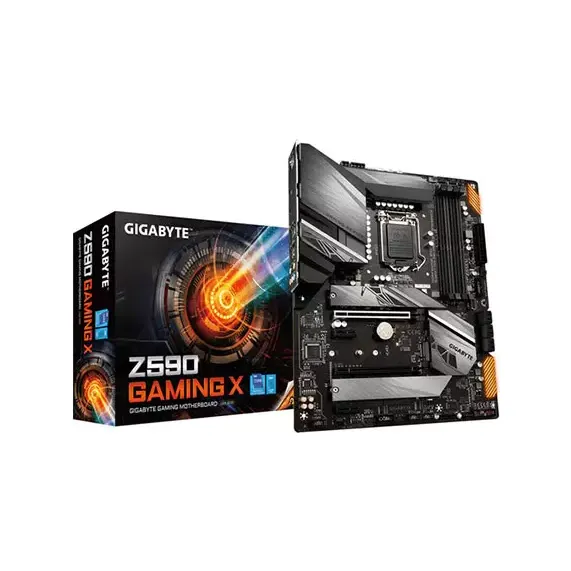
Gigabyte Z590 GAMING X LGA 1200 ATX Motherboard

Motherboard • Brand: Gigabyte • Aggregating live prices from leading computer stores in Bangladesh.

Status
Check Stores
6 listings tracked
Lowest Deal 19,600 Best Deal
Price Range 19,600 to 24,500 Save 25%
Gigabyte Z590 GAMING X LGA 1200 ATX Motherboard

Product Description

Engineered by Gigabyte, this motherboard is designed for **LGA1200** socket processors, featuring a **ATX** form factor, and supporting high-speed **DDR4** memory, providing a reliable foundation for custom desktop systems. Currently, the lowest price in Bangladesh for this item is **19,600 ৳**, with active inventory listings tracked from TechLand BD, Binary Logic, Creatus Computer and other retailers.
Part ID: #CAN-01743 Last Updated: 2 days ago

Available Deals & Price Comparison

Prices updated daily
Retailer Stock Status Price Last Checked Action
Sell Tech Gigabyte Z590 Gaming X Intel 10th and 11th Gen ATX Motherboard
Check Stock Call for Price 3 hours ago
TechLand BD Gigabyte Z590 GAMING X LGA 1200 ATX Motherboard
Check Stock 19,600 3 hours ago
PC House Gigabyte Z590 Gaming X Intel 10th and 11th Gen ATX Motherboard
Check Stock 20,300 2 hours ago
Creatus Computer Gigabyte Z590 Gaming X Intel 11th Gen ATX Motherboard
Check Stock 21,300 3 hours ago
Binary Logic Gigabyte Motherboard Z590 GAMING X 11th GEN
Check Stock 21,500 3 hours ago
Nexus Computer Gigabyte Z590 GAMING X LGA 1200 ATX Motherboard
Check Stock 24,500 2 hours ago

Historical Pricing Trend

Product Specifications

General Specifications

LAN Realtek 2.5GbE LAN chip ( 2.5 Gbit/ 1 Gbit/100 Mbit)
USB 1 x USB Type-C® port on the back panel, with USB 3.2 Gen2 support 1 x USB Type-C® port with USB 3.2 Gen1 support, available through the internal USB header 1 x USB 3.2 Gen2 Type-A port (red) on the back panel 7 x USB 3.2 Gen1 ports (5 ports on the back panel, 2 ports available through the internal USB header) Chipset+ 2 USB 2.0 Hub: 6 x USB 2.0/1.1 ports (2 ports on the back panel, 4 ports available through the internal USB headers)
BIOS 1 x 256 Mbit flash Use of licensed AMI UEFI BIOS PnP 1.0a, DMI 2.7, WfM 2.0, SM BIOS 2.7, ACPI 5.0
Audio Realtek® Audio codec High Definition Audio 2/4/5.1/7.1-channel Support for S/PDIF Out
Slots 1 x PCI Express x16 slot, running at x16 (PCIEX16) * For optimum performance, if only one PCI Express graphics card is to be installed, be sure to install it in the PCIEX16 slot. (The PCIEX16 slot conforms to PCI Express 4.0 standard.)* *Supported by 11th Generation processors only. 1 x PCI Express x16 slot, running at x4 (PCIEX4) 2 x PCI Express x1 slots (The PCIEX4 and PCI Express x1 slots conform to PCI Express 3.0 standard)
Memory Memory Slots 4 x 288-Pin Memory Support DDR4 2133, 2400, 2666, 2800, 2933, 3000, 3200, 3300, 3333, 3400, 3466, 3600, 3666, 3733, 3800, 3866, 4000, 4133, 4266, 4300, 4400, 4500, 4600, 4700, 4800, 4933, 5000, 5133, 5333 MHz Maximum Capacity 128 GB Channel Architecture Dual Channel ECC Support Non-ECC, ECC Unbuffered
Chipset Intel Z590 Express Chipset
Graphics Integrated Graphics Processor-Intel® HD Graphics support: 1 x DisplayPort, supporting a maximum resolution of 4096x2304@60 Hz. *Support for DisplayPort 1.2 version and HDCP 2.3
Warranty 03 Years
Form Factor ATX Form Factor; 30.5cm x 24.4cm
Supported CPU 11th Generation Intel® Core™ i9 processors / Intel® Core™ i7 processors / Intel® Core™ i5 processors 10th Generation Intel® Core™ i9 processors / Intel® Core™ i7 processors / Intel® Core™ i5 processors / Intel® Core™ i3 processors/ Intel® Pentium® processors / Intel® Celeron® processors* * Limited to processors with 4 MB Intel® Smart Cache, Intel® Celeron® G5xx5 family. L3 cache varies with CPU
Supported Storage CPU: 1 x M.2 connector (Socket 3, M key, type 2260/2280/22110 PCIe 4.0 x4/x2 SSD support) (M2P_CPU)* *Supported by 11th Generation processors only. Chipset: 2 x M.2 connector (Socket 3, M key, type 2260/2280/22110 SATA and PCIe 3.0 x4/x2 SSD support) (M2A_SB) (M2M_SB) 6 x SATA 6Gb/s connectors Support for RAID 0, RAID 1, RAID 5, and RAID 10 * Refer to "1-7 Internal Connectors," for the installation notices for the M.2 and SATA connectors. Intel® Optane™ Memory Ready
External I/O Ports 1 x PS/2 keyboard/mouse port 1 x USB Type-C® header, with USB 3.2 Gen2 support 1 x DisplayPort 1 x USB 3.2 Gen 2 Type-A port (red) 5 x USB 3.2 Gen 1 ports 2 x USB 2.0/1.1 ports 1 x RJ-45 port 6 x audio jacks
Internal I/O Ports 1 x 24-pin ATX main power connector 1 x 4-pin ATX 12V power connector 1 x 8-pin ATX 12V power connector 1 x CPU fan header 4 x system fan headers 2 x addressable LED strip headers 2 x RGB LED strip headers 6 x SATA 6Gb/s connectors 3 x M.2 Socket 3 connectors 1 x front panel header 1 x front panel audio header 1 x S/PDIF Out header 1 x USB Type-C® header, with USB 3.2 Gen1 support 1 x USB 3.2 Gen 1 header 2 x USB 2.0/1.1 headers 1 x Trusted Platform Module header (For the GC-TPM2.0 SPI/GC-TPM2.0 SPI 2.0 module only) 2 x Thunderbolt™ add-in card connectors 1 x serial port header 1 x Clear CMOS jumper 1 x Q-Flash Plus button
Part ID: #CAN-01743 Last Updated: 2 days ago
Intel® Z590 GAMING Motherboard with Direct 12+1 Phases Digital VRM with DrMOS, Full PCIe 4.0* Design, Fully Covered Thermal Design with Integrated IO Armor, PCIe 4.0 M.2 with Thermal Guard, 2.5GbE Gaming LAN, USB 3.2 Gen2 TYPE-C® , RGB FUSION 2.0, Q-Flash Plus DIRECT POWER DESIGN Z590 GAMING X motherboard uses an 12+1 phases digital CPU power design which includes both digital PWM Controller and DrMOS. These 100% digital controller and additional 8+4 Solid-pin CPU Power Connectors offer incredible precision in delivering power to the motherboard's most power-hungry and energy-sensitive components, allowing enthusiasts to get the absolute maximum performance from the new Intel 11th Gen CPU. XMP 4800+ PCIe 4.0 Hardware Design 3X PCIe 4.0/3.0 x4 M2   PERFORMANCE With the best quality components and GIGABYTE R&D design capability, the Z590 GAMING is a true beast among motherboards. Thermal Design Fully Covered MOSFET heatsink M.2 Thermal Guard Smart Fan 6   ADVANCED THERMAL SOLUTION Z590 GAMING X uses high performance Fully Covered thermal design with high coverage MOSFET Heatsinks and thick thermal pad, providing ultimate MOSFET cooling performance for enthusiasts, overclockers and gamers. 2.5GbE LAN Intel® USB 3.2 Gen2 Type-C® Support   NEXT GENERATION CONNECTIVITY A high-end product needs to be future-proof so your system stays up-to-date with the latest technology. Z590 GAMING X provides all next generation network, storage, connectivity to keep you up to speed. HI-FI AUDIO SYSTEM   High-End Audio Capacitors GIGABYTE motherboards use high-end audio capacitors. These high quality capacitors help deliver high resolution and high fidelity audio to provide the most realistic sound effects for gamers. Audio Noise Guard GIGABYTE motherboards feature an audio noise guard that essentially separates the board’s sensitive analog audio components from potential noise pollution at the PCB level. RGB FUSION RGB FUSION Software RGB FUSION APP   DEFINITIVE AESTHETICS Z590 GAMING X features RGB FUSION 2.0 and offers users the option to control onboard, external light strips, and/or GIGABYTE devices with RGB/ Addressable RGB LEDs to make their PC more unique and stylish. Q-Flash Plus PCIe Armor Double Locking Bracket Solid Pin   ULTRA DURABLE GIGABYTE is reputable for its product durability and high quality manufacturing process. Needless to say, we use the best components we can find for the Z590 GAMING motherboard and reinforce every slot to make each of them solid and durable. GIGABYTE BIOS & APP CENTER Good software goes hand in hand with perfect hardware. GIGABYTE motherboard bundled several useful and intuitive software to help users to control every aspect of motherboard. BIOS APP Center Easy Tune System Information Viewer   BIOS New User Interface All new EASY MODE shows important hardware information in one page including CPU clock, Memory, Storage, Fan. My Favorites Add constantly used items into the favorite menu for quick access. Storage Information Show all kinds of storage information including SATA, PCIE and M.2 interface. Changelog List all changes before saving and exiting bios. Quickly review overall settings modification. Intuitive Load Line Curve Clearly show each loadline calibration setting in an intuitive curve graph.

Discussion & Comments

You must be logged in to post comments.

No comments yet. Be the first to start the discussion!