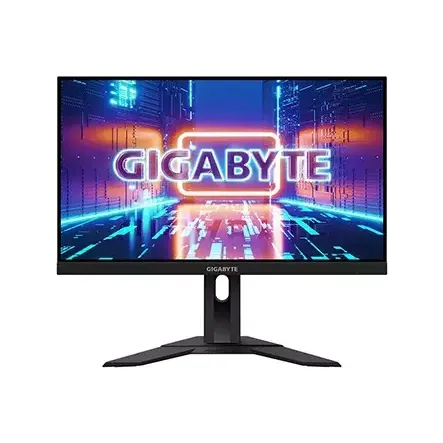
Gigabyte G24F-EK 24 Inch 165Hz Full HD IPS Gaming Monitor

Monitor • Brand: Gigabyte • Aggregating live prices from leading computer stores in Bangladesh.

Status
Check Stores
3 listings tracked
Lowest Deal 15,200 Best Deal
Price Range Single price listing
Gigabyte G24F-EK 24 Inch 165Hz Full HD IPS Gaming Monitor

Product Description

The **Gigabyte G24F-EK** is a premium quality **Monitor** designed to offer durability, high efficiency, and seamless compatibility with standard desktop PC configurations. PCPartsBD lists the best deal for this item at **15,200 ৳** after tracking live prices across leading BD tech merchants.
Part ID: #CAN-08012 Last Updated: 2 days ago

Available Deals & Price Comparison

Prices updated daily
Retailer Stock Status Price Last Checked Action
Creatus Computer Gigabyte G24F 23.8 inch 165Hz Full HD IPS Gaming Monitor
Check Stock Call for Price 1 hour ago
Creatus Computer Gigabyte G24F-EK 24 Inch FHD IPS Dual HDMI DP Gaming Monitor
Check Stock Call for Price 1 hour ago
TechLand BD Gigabyte G24F-EK 24 Inch 165Hz Full HD IPS Gaming Monitor
Check Stock 15,200 1 hour ago

Historical Pricing Trend

Product Specifications

General Specifications

USB 2 x USB Type-A 1 x USB Type-B
Port 2 x HDMI 1 x DisplayPort
Tilt -5 - 20 degree
Brand Gigabyte
Color Black
Model G24F-EK
Weight 5.3 kg (with stand), 3.6 kg (without stand)
Contrast 1000:1
Warranty 3-Years
Dimension 541 x 519 x 137mm (with stand), 541 x 326 x 53mm (without stand)
Brightness 300cd/m2
Panel Type IPS
Resolution 1920x1080
Technology Adaptive-Sync Technology: Yes AMD Radeon FreeSync: Yes
Accessories Power cable, HDMI cable, DP cable, USB cable, QSG, Warranty card
Color Depth 8 bits
Color Gamut 90% DCI-P3, 120% sRGB
Screen Size 24 inch
Aspect Ratio 16:9
Display Type FHD LED Display
Refresh Rate 165Hz
Response Time 1ms
Viewing Angle 178 degree (H & V)
Certifications Eye Care Features: Certified by TUV Rheinland and Eyesafe
Wall mountable 100 x 100mm
Display Details Display Surface: Non-Glare
Power Consumption 48W (max), 0.5W (saving), 0.3W (off)
Part ID: #CAN-08012 Last Updated: 2 days ago
SPECIFICATIONS Display Features Panel Type IPS Screen Size 23.8" Display Type Backlit LED Resolution 1920 x 1080 (FHD) Brightness 300 cd/m2 (TYP) Response Time 1ms (MPRT) / 2ms (GTG) Viewing Angle 178°(H)/ 178°(V) Contrast Ratio 1000 : 1 Color Support Color Saturation: 90% DCI-P3/120% sRGB Display Colors: 8 bits Refresh Rate 165Hz/OC 170Hz Others Features OSD Sidekick Aim Stabilizer Black Equalizer Dashboard Crosshair Timer Counter Crosshair Auto-Update Smart OD Connectivity HDMI HDMI 2.0 x2 Display Port Display port 1.2 x1 USB Port(s) USB 3.0 *2 Audio/Video Features Low Blue Light Yes Flicker Free Yes Free Sync Support Yes Power Type Build-in (AC 100V~240V /50~60Hz) Power Consumption 48W(MAX) Saving Mode: 0.5W Power Off Mode: 0.3W Others Height Adjustment (mm): 130mm Physical Specification Dimension Phys. Dimension with Stand(WxHxD): 541 * 519.3 * 136.75mm Phys. Dimension w/o stand (WxHxD): 541 * 326.4 * 53.4mm Weight Net Weight with stand (Esti.): 5.3Kg Net Weight without stand (Esti.): 3.6Kg Tilt -5°~+20° Warranty Information Manufacturing Warranty 3 Years Gigabyte G24F 23.8 inch Full HD IPS Gaming Monitor The Gigabyte G24F is a very decent gaming monitor with good colors and a very appealing 170Hz design which is both Freesync and G-Sync compatible. This makes the monitor a recommended option for gamers who are looking to enter the eSports and competitive gaming space for the first time. Pair that with an affordable graphics card such as the 6500 XT or the RTX 3050, then you are in for a gaming treat at 1080p. It does lack behind some other options but being an IPS panel, it still managed to deliver a good gaming experience. Plus the built-in OSD is very responsive and doesn't lag at all. Overall, I would definitely recommend this monitor to the gaming audience looking for an affordable & fast display. THE LAST MILE FOR YOUR GAMING SYSTEM As an unseen player, monitor is often being underestimated. The truth is monitors form as a synergistic effect and bring out the best performance of PC components. GIGABYTE gaming monitors offer the ultimate specifications and quality, users can truly enjoy upscale performance without the need for extravagance. 1ms MPRT Response Time Super fast 1ms response time for the most smooth gaming experience ever! FHD with 165Hz (OC 170Hz) High resolution and fast refresh rate, giving you the detailed display quality and fluid gaming experience! 8-bit color, 90% DCI-P3 Fantastic color display and 90% DCI-P3 super wide-gamut color. SIMPLE BUT STYLISH The streamline appearance represents the simplicity of the GIGABYTE gaming series design philosophy, sturdy stand and matte finish built for functional and aesthetic features adding more to the characteristics. PERFECT VIEWING ANGLE GIGABYTE Gaming monitor features an exclusive stand that's ergonomically designed to offer extensive range of height and tilt adjustments. GAMING FEATURES OSD Sidekick: GIGABYTE OSD Sidekick allows you to set the display options with keyboard and mouse, giving you the easiest way to adjust monitor settings. Timer: Onscreen timer will assist you on tracking the elapsed game time. Counter: The gaming counter will help you calculate the time more easily. Crosshair: This feature will allow you to customize crosshairs that helps improve your aim in the shooting game. Alignment: The display alignment function will facilitate you on the multi-display set-up, monitors will line up perfectly. Aim Stabilizer: This feature will reduce motion blur so you will have a better visual clarity that helps tracing the track of bullet and aim the target easily. Dashboard: The dashboard reveals your real-time hardware information including CPU voltages, clock speed, temperatures, etc. The best part is that it won’t be blocked by any games. Black Equalizer: This feature allows you to have more details of the dark side without overexposing the bright side at the same time. Auto-Update: Users can effortlessly enjoy the finest gaming experience with features GIGABYTE continues to develop and upgrade while giving extra protection to your monitor. ..

Discussion & Comments

You must be logged in to post comments.

No comments yet. Be the first to start the discussion!