Status
In Stock
4 stores
Lowest Deal
225,000 BDT
Best Deal
Price Range
225,000 to 285,000 BDT
Save 21%
Product Description
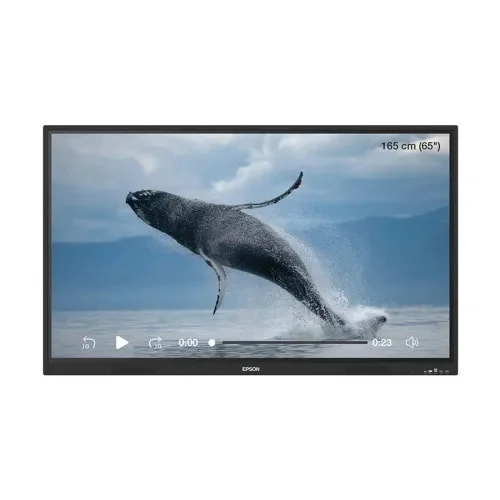
The **Epson Epson** is a premium quality **Monitor** designed to offer durability, high efficiency, and seamless compatibility with standard desktop PC configurations. You can buy this component starting from **225,000 ৳**, compared dynamically across 2 major computer shops.
Part ID: #CAN-10423
Last Updated: 6 hours ago
Available Deals & Price Comparison
Prices updated daily| Retailer | Stock Status | Price | Last Checked | Action |
|---|---|---|---|---|
|
Creatus Computer
Epson EI-P6501 65-inche 4K UHD Interactive Flat Panel Display
|
In Stock | Call for Price | 6 hours ago | |
|
Skyland BD
Epson EI-P6501 65" 4K UHD Interactive Flat Panel Display
|
In Stock | 225,000 | 6 hours ago | |
|
Skyland BD
Epson EI-P7501 75" 4K UHD Interactive Flat Panel Display
|
In Stock | 285,000 | 6 hours ago | |
|
Skyland BD
Epson EI-P8601 PowerBoardPRO 86″ 4K UHD Interactive Flat Panel Display
|
Check Stock | Call for Price | 6 hours ago |
Historical Pricing Trend
Product Specifications
Display Features
Display Size
65-inche
Display Type
Interactive Flat Panel Display (IFP)
Panel Type
IPS
Resolution
4K Ultra HD (3840 × 2160)
Pixel pitch(MM)
N/A
Display Surface
Anti-glare, Tempered Glass (9H surface hardness)
Viewing Angle
N/A
Aspect Ratio
16:9
Brightness
400 nits (typical)
Contrast Ratio
1,200:1 (typical), 50,000:1 (dynamic)
Refresh Rate
60Hz
Color Support
10-bit
Color Gamut
72% NTSC (typical)
Response Time
N/A
Curvature
Flat
Video Features
Flicker Free
N/A
G-Sync Support
N/A
Free Sync Support
N/A
Low Blue Light
N/A
HDCP
N/A
Color Temperature Selection
N/A
Audio Features
Speaker (Built In)
2 × 20W
Connectivity
Audio Jack
Audio Jack: 3.5mm Line In (Audio Input), 3.5mm Line Out (Earphone)
HDMI
Input: 3 × HDMI 2.0 (Front 1, Rear 2) Output: 1 × HDMI 2.0
USB Port(s)
USB-A (3.0) × 3, USB-A (2.0) × 2, USB-C × 1, USB-B (touch) × 2 (3.0)
D-Sub
N/A
Display Port
N/A
USB Type-C
Yes (Front, USB 3.1, PD 65W w/o OPS, PD 15W with OPS)
VGA
USB-A (3.0) × 3, USB-A (2.0) × 2, USB-C × 1, USB-B (touch) × 2 (3.0)
Others
OPS Slot × 1, TF Card Slot, Wi-Fi 6E, Bluetooth v5.3, LAN: 2 × Ethernet (10M/100M/1000Mbps), Touch: 40-point multi-touch (20 writing points), Touch Response Time: ≤10ms, Touch Tool: PowerNotePro, OS: Android 14, CPU: Octa-Core (A72×4 + A53×4), GPU: Mali-G52 MC3, RAM: 8GB, ROM: 128GB
Mechanical Design
Pivot
N/A
Swivel
N/A
Tilt
N/A
Height Adjustment
N/A
Security Locker
N/A
Vesa Wall Mount
N/A
Power
Adapter Type
N/A
Type
Interactive Touch Display
Voltage
AC 100~240V, 50/60Hz
Power Consumption
165.5W (typical); ≤0.5W (standby)
Physical Specification
Weight
30.35 Kg
Colors
N/A
Warranty Information
Warranty
3 Years (Transportation/conveyance bill applicable for outside Dhaka for installation or service)
Part ID: #CAN-10423
Last Updated: 6 hours ago
Epson Interactive Flat Panel Display Finding the right Epson interactive flat panel display price in BD starts with knowing what you actually need on your wall or in your boardroom. Whether you're upgrading a classroom, a corporate meeting room, or a training centre, an interactive flat panel display brings together a large 4K screen, a responsive touchscreen, and a built-in Android computer, all in one unit. It replaces the old combination of a projector, a whiteboard, and a separate PC, which means less cabling, fewer breakdowns, and a much smoother experience for teachers and presenters alike. Epson panels are known across Bangladesh for pairing this kind of all-in-one convenience with reliable display engineering, which is why the brand keeps coming up whenever institutions compare their options. What Is an Interactive Flat Panel Display An interactive flat panel, often shortened to IFP, is essentially a giant touchscreen monitor built for collaboration. Instead of just displaying content like a regular flat display monitor, it lets you write, annotate, and interact directly on the screen using your finger or a stylus. Most modern panels run on Android, so you can open apps, browse the internet, and use built-in whiteboard tools without connecting a separate laptop. For Bangladeshi schools and offices that need a screen which actually earns its price tag, this all-in-one design is the main draw, and it's the same principle Epson builds its interactive lineup around. Epson Interactive Flat Panel Display price in BD The flat panel display price in bd depends heavily on screen size, touch technology, and the processing power inside the unit. Larger 65-inch and above panels with 4K resolution, higher RAM, and more storage naturally sit at a higher price point than smaller, basic models, and Epson's range follows that same pattern, so pricing shifts depending on which size and configuration fits your room. When you're comparing flat display monitor price in bd across brands, it helps to look beyond the sticker price and check what's actually included: touch accuracy, warranty coverage, and after-sales support all affect long-term value. At Creatus Computer, you'll find transparent pricing on Epson panels with official warranty backing, so you know exactly what you're paying for before you commit. Key Features to Check Before You Buy Not every interactive panel is built the same, and a few specs make a real difference in daily use, especially on an Epson unit where display quality is usually the best selling point. Display quality matters most. Look for a true 4K Ultra HD resolution (3840×2160) on an IPS panel, since IPS technology gives you consistent colour and wide viewing angles, useful when a room full of students or colleagues is watching from different angles. A 10-bit colour depth and a wide colour gamut, around 72% NTSC, keep visuals sharp for both presentations and video playback, while anti-glare tempered glass cuts down on reflections under classroom or office lighting. Touch performance is the second big factor. A panel with up to 40 touch points and fast response times under 10 milliseconds feels natural to write and draw on, almost like a real whiteboard. Surface hardness ratings around 9H also mean the screen resists scratches from daily stylus and finger use over years of classroom wear. Processing power decides how smoothly the panel runs. An octa-core processor paired with 8GB RAM and 128GB of internal storage is enough to run Android smoothly, handle multiple apps, and store lesson files or presentation decks directly on the device. Connectivity rounds out the picture. Multiple HDMI inputs, USB-A and USB-C ports, an OPS slot for module upgrades, Wi-Fi 6E, and Bluetooth 5.3 mean you can connect laptops, cameras, and peripherals without hunting for adapters, all standard on the Epson models Creatus Computer stocks. Why Choose an Epson Interactive Flat Panel for Your Classroom or Office Bangladesh's classrooms and offices deal with real-world constraints: tight budgets, shared power circuits, and rooms that need to double up for different uses throughout the day. An interactive flat panel with low standby power, as low as 0.5W, and efficient typical power consumption around 165W is a practical choice for institutions watching their electricity costs, especially with fluctuating power conditions in many areas of the country. Beyond the hardware, these panels genuinely change how a room works. A single 65-inch touchscreen replaces a projector, screen, whiteboard, and marker tray, freeing up space and cutting maintenance headaches. For teachers, that means less time fiddling with cables and more time actually teaching. For office teams, it means faster, more visual meetings without passing a laptop around the table. Choosing Epson specifically adds the brand's long track record in display and imaging technology, which many institutions already trust from years of using Epson projectors. Shop Epson Interactive Flat Panel Displays at Creatus Computer When you're ready to buy, Creatus Computer offers competitive pricing on Epson interactive flat panels, a genuine manufacturer warranty, and reliable after-sales support across Bangladesh. Every Epson panel listed comes with clear specifications, so you can match the right screen size and features to your room without guesswork. Fast delivery is available within Dhaka, and our team can guide you through installation requirements for classrooms, conference rooms, or training centres. Ready to upgrade your space? Browse our full range of Epson interactive flat panel displays online, or visit your nearest Creatus Computer showroom to see the screens in person before you buy. FAQ Q1: What is the average price of an Epson interactive flat panel display in BD? Prices vary by screen size and specification. Larger 65-inch 4K models with higher RAM and touch points cost more than smaller, basic panels. Check individual product pages for current Epson pricing. Q2: What's the difference between an Epson interactive flat panel and a regular flat display monitor? A regular flat display monitor only shows content. An Epson interactive flat panel adds touchscreen input, built-in Android software, and collaboration tools, letting you write and interact directly on the screen. Q3: Do Epson interactive flat panels work without a separate computer? Yes. Most panels run on Android with built-in apps, so you can present, browse, and annotate without connecting an external PC, though you can still plug one in via HDMI or USB-C if needed. Q4: How many people can use the touchscreen at once? Panels with 40-point multi-touch support allow multiple users to write and interact on the screen simultaneously, useful for group activities in classrooms or collaborative sessions in meetings. Q5: Is the screen durable for daily classroom use? Yes. Panels with tempered glass and 9H surface hardness resist scratches and daily wear from stylus and finger use over years of use. Q6: What ports do Epson interactive flat panels typically include? Most panels include multiple HDMI inputs, USB-A and USB-C ports, VGA, LAN, and an OPS module slot, along with built-in Wi-Fi and Bluetooth for wireless connectivity...
Discussion & Comments
You must be logged in to post comments.
No comments yet. Be the first to start the discussion!