Status
In Stock
4 stores
Lowest Deal
42,500 BDT
Best Deal
Price Range
Single price listing
Product Description
The **BenQ PD2700Q** is a premium quality **Monitor** designed to offer durability, high efficiency, and seamless compatibility with standard desktop PC configurations. You can buy this component starting from **42,500 ৳**, compared dynamically across 4 major computer shops.
Part ID: #CAN-08551
Last Updated: 3 months ago
Available Deals & Price Comparison
Prices updated daily| Retailer | Stock Status | Price | Last Checked | Action |
|---|---|---|---|---|
|
Computer Village
BENQ PD2700Q 27 INCH QHD IPS MONITOR
|
In Stock | 42,500 | 1 week ago | |
|
PC House
BenQ PD2700Q DesignVue 27 inch 2K QHD 1440p IPS Monitor
|
Check Stock | Call for Price | 3 hours ago | |
|
Ultra Technology
BenQ PD2700Q DesignVue 27 inch 2K QHD 1440p IPS Monitor
|
Check Stock | Call for Price | 3 hours ago | |
|
Nexus Computer
BenQ PD2700Q Design Vue 27 inch 2K QHD 1440p IPS Monitor
|
Check Stock | 41,000 | 3 hours ago |
Historical Pricing Trend
Product Specifications
Display Features
Display Size
27"
Display Type
LED
Resolution
2560x1440
Aspect ratio
16:9
Viewing Angle
178/178
Brightness
350 cd/㎡
Contrast Ratio
1000:1
Refresh rate
60Hz
Color Support
100% sRGB/Rec. 709
Response Time
4ms (GtG)
Power
Power Consumption
Voltage Rating :100 - 240V, Power Supply : Built-in, Power Consumption (on mode.) : 58W, Power Consumption (based on Energy Star) : 28W, Power Consumption (stand by mode) : 0.5W, Power Consumption (sleep mode) : 0.5W
Audio Features
Speaker Details
Speakers: Built-in Speaker : 1Wx2, Low Blue Light: Yes, Flicker-Free: Yes
Speaker
Built-in Speaker : 1Wx2
WARRANTY INFORMATION
Manufacturing Warranty
03 Year Warranty
Part ID: #CAN-08551
Last Updated: 3 months ago
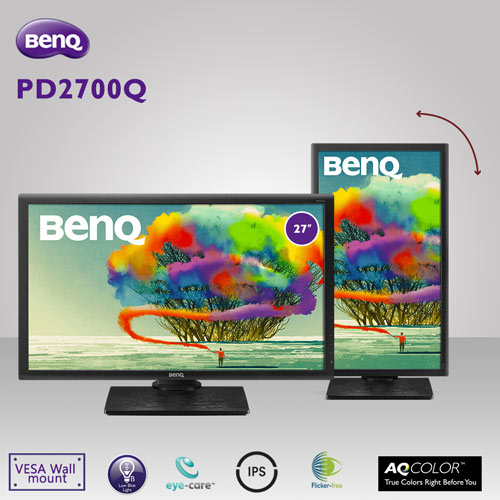
BenQ PD2700Q DesignVue 27 inch 2K QHD 1440p IPS MonitorThe PD2700Q 27 inch 16:9 IPS Monitor from BenQ is a professional monitor designed for users who need accurate colors. It's built with an In-Plane Switching (IPS) panel that provides you with wide 178° viewing angles and vivid color reproduction. Combined with its 10-bit color support, and 100% Rec.709 and sRGB coverage, you'll be able to work with a wide and accurate color pallet. For additional clarity, this display has a 2560 x 1440 QHD screen that offers four times the resolution of a standard 720p screen so you'll be able to work on the finer details. Utilize its Darkroom, CAD/CAM, and Animation modes to assist you with your craft and adjust your desktop partition for an easier time multitasking. Connect this display to your system via HDMI, Display Port or Mini Display Port, and then adjust it to your viewing preference. Proprietary BenQ Display Pilot software splits your desktop into multiple window partitions for easy multitasking. BenQ exclusive eye-care technologies reduce eye fatigue for user comfort, enhanced productivity, and workplace safety during extended use. Unique BenQ Low Blue Light Technology is designed to filter out harmful blue light, effectively diminishing eye fatigue and irritation. Flicker-free eliminates flickering at all brightness levels and reduces eye fatigue effectively. Conventional LCD screens flicker at the rate of 250 times per second. Your eyes may not see the flickers but they can certainly feel them. So relieve your eyes from the uncomfortable flickering effect by switching to a BenQ flicker-free monitor.BenQ PD2700Q Monitor ReviewThe BenQ PD2700Q is a multi-discipline monitor, designed for everyday use in the home or office. It features a sleek design that offers plenty of flexibility over its height and gives plenty of scope when it comes to angle adjustment. The build is solid, and there’s an overall feeling of quality despite the relatively cheap price tag. Once calibrated, it’s one size fits all design does the job, producing an excellent representation of your image or video when used for production, but it’s equally suited to gaming, word processing or CADCAM. My criticism would be the resolution. QHD is suitable for all-around use and will be perfectly adequate for most photographers until you take that step to a professional level. In a professional imaging environment, that extra resolution is required for seeing images in all there glory, pixel for pixel. It’s also essential for being able to watch back 4K video at full resolution.The BenQ PD2700Q is a great all-around monitor; if photography is your hobby, then you really can’t go wrong with a display at this price. Pro’s will also find the BenQ PD2700Q is good as a 2nd or 3rd monitor, but the resolution prevents it from being a viable main display. There are many different monitor types; some are bright, vibrant, with hi-refresh rates specially designed for gaming. Then there are the accurate colour displays for imaging and video, and of course, at the tail end, there’s the general home and business jack of all. The BenQ PD2700Q 27-inch fits into this last category, it may be large at 27-inch, but it’s been primarily designed as a general use monitor.It is, however, a step above many other monitors of this type, even dedicated video monitors. It’s streamlined, easy to set up, usable out of the box and once switched on gives you an instant clear and crisp picture. Two months of testing and this sample has sat comfortably on the desk alongside a 4K 32-inch monitor. Although for the most part, it wasn’t used as the primary display, it was extensively used for graphics work, word processing, email and anything non Lightroom and FCPX.PerformanceThese performance results are taken once the monitor has been fully calibrated with the Spyder5Elite. Unlike gaming or word processing when it comes to processing images, we need to reduce the brightness of our monitors. There’s plenty of adjustment, but when so many monitors in the general use sector are aimed at pleasing the masses, low brightness quality can often be affected. Here the BenQ stands up to the test well; calibration set the brightness at 25% which measured 121 cd/m2. BenQ rates the monitor with a maximum of 350 cd/m2, in our test it didn’t quite make this value, but at 324.2 cd/m2, it wasn’t far off.Contrast was as good as you get with a ratio that balanced around the 790:1 value for the Datacolor test, this resulted in a rating of 5/5 overall. Likewise, colour uniformity across the screen was excellent with only the slightest variation towards the edges but not so you’d notice even with careful inspection. Colour accuracy, the most crucial factor for any imaging monitor was also good at 3.5/5. Luminance uniformity was the only area that highlighted any issues with a slight hot spot in the bottom left-hand corner. However, this brightness difference is still not enough to be spotted by eye.
Discussion & Comments
You must be logged in to post comments.
No comments yet. Be the first to start the discussion!