Status
In Stock
5 stores
Lowest Deal
38,300 BDT
Best Deal
Price Range
38,300 to 40,000 BDT
Save 4%
Product Description
Immersive Gaming at its Best
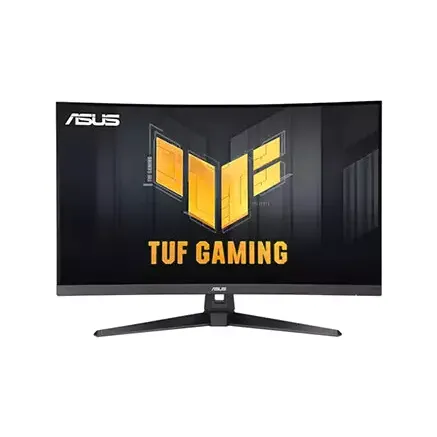
The ASUS TUF Gaming VG32VQM5B is a premium gaming monitor designed for serious gamers seeking an unparalleled level of immersion and performance. With its stunning 31.5-inch curved display and lightning-fast 250Hz refresh rate, this monitor is the perfect companion for professional gamers and enthusiasts alike.
Key Features and BenefitsThe ASUS TUF Gaming VG32VQM5B boasts a range of impressive features, including:
- 31.5-inch WQHD (2560 x 1440) panel with a 1800R curvature for a more immersive gaming experience.
- 250Hz refresh rate for silky-smooth gameplay and reduced motion blur.
- HDR10 support for enhanced color and contrast.
- FreeSync technology for tear-free gaming and seamless performance.
- ASUS Shadow Boost technology for improved dark area visibility and reduced eye strain.
The ASUS TUF Gaming VG32VQM5B features ASUS Extreme Low Motion Blur Sync (ELMB SYNC), a revolutionary technology that enables the simultaneous use of Motion Blur Reduction and Adaptive-sync, resulting in sharp, high-speed frames and reduced ghosting and tearing.
Part ID: #CAN-07902
Last Updated: 1 week ago
Available Deals & Price Comparison
Prices updated daily| Retailer | Stock Status | Price | Last Checked | Action |
|---|---|---|---|---|
|
Nexus Computer
ASUS TUF Gaming VG32VQM5B 31.5" FHD 250Hz Curved Gaming Monitor
|
In Stock | Call for Price | 2 hours ago | |
|
TechLand BD
ASUS TUF Gaming VG32VQM5B 31.5 Inch Full HD 250Hz Curved Monitor
|
In Stock | 38,300 | 4 weeks ago | |
|
Ultra Technology
ASUS TUF Gaming VG32VQM5B 31.5-inch Full HD 250Hz Curved Gaming Monitor
|
In Stock | 38,300 | 1 month ago | |
|
Global Brand PLC
ASUS TUF Gaming VG32VQM5B 31.5-inch Full HD 250Hz Curved Gaming Monitor
|
In Stock | 40,000 | 2 hours ago | |
|
PC House
ASUS TUF Gaming VG32VQ 32 inch WQHD Curved HDR Gaming Monitor
|
Check Stock | 60,000 | 2 hours ago |
Historical Pricing Trend
Product Specifications
General Specifications
HDR
HDR10
HDMI
HDMI(v2.0) x 2
Port
DisplayPort 1.2 x 1Earphone Jack: Yes
Tilt
Tilt: Yes (+23° ~ -5°)
Weight
Net Weight: 6.8 kg (14.99 lbs)Net Weight without Stand: 5.8 kg (12.79 lbs)Gross Weight: 9.1 kg (20.06 lbs)
Voltage
100-240V, 50/60Hz
Contrast
100,000,000:1 (HDR, Max)3500:1 (Typ.)
Warranty
3-Year Brand Warranty
Backlight
LED
Dimension
Phys. Dimension: 71.0 x 50.7 x 21.4 cmPhys. Dimension without Stand: 71.0 x 42.6 x 8.7 cmBox Dimension: 81.0 x 52.0 x 22.6 cm
Brightness
LED
Panel Type
Fast VA
Resolution
1920x1080
Accessories
DisplayPort cableL-shaped ScrewdriverPower cordQuick start guideWarranty Card
Pixel Pitch
0.363mm
Screen Size
31.5 inch
Aspect Ratio
16:9
Display Area
698.4 x 392.85 mm
Refresh Rate
250Hz
Color Support
120% sRGB
Response Time
0.5ms (GTG, min.)
Viewing Angle
178°/ 178° (CR≧10, H/V)
Certifications
TÜV Flicker-freeTÜV Low Blue LightVESA AdaptiveSync Display 250HzAMD FreeSync PremiumFSC MIX
Display Colors
16.7M
Other Features
Signal Frequency:Digital Signal Frequency: HDMI: 30-300KHz(H), 48-250HZ(V)DP: 300-300 KHz(H), V:48-250 HZ(V)
Video Features
Trace Free Technology: YesGameVisual: YesColor Temp. Selection: Yes(4 modes)GamePlus: YesHDCP: Yes, 2.2ELMB Sync: YesVRR Technology: Yes (Adaptive-Sync)GameFast Input technology: YesShadow Boost: YesDisplayWidget: Yes, DisplayWidget CenterLow Blue Light: YesMultiple HDR Mode: YesASUS Power Sync: Yes
Wall mountable
100x100mm
Display Details
Curvature: 1500RFlicker-free: Yes
Display Surface
Anti-Glare
Built-in Speaker
2Wx2
Power Consumption
28.6 W
Power Saving Mode
0.5W
Brightness (typical)
300cd/㎡
Part ID: #CAN-07902
Last Updated: 1 week ago
Discussion & Comments
You must be logged in to post comments.
No comments yet. Be the first to start the discussion!